


Introduction
While most agents are still cold-calling and door-knocking, top producers are generating 50+ qualified leads per month on autopilot through Facebook ads. What if you could wake up to new buyer and seller leads every morning without lifting a finger?
You've probably tried Facebook ads before and walked away frustrated. Maybe you spent money with nothing to show for it. Maybe the leads were terrible. Maybe you had no idea what you were doing and gave up after a week.
Most agents fail at Facebook ads because they treat it like boosting a post and hoping for the best. But when you understand the strategy behind real estate branding through Facebook advertising, everything changes.
Benefits Of Facebook Ads For Real Estate
Facebook advertising offers massive reach with precision targeting. You're tapping into billions of active users, but you're not casting a wide net and hoping for the best. You're showing your message to exactly the people who are most likely to buy or sell in your area.
Unlike open houses or networking events, your ads work 24/7. They generate leads while you sleep, on weekends, and during vacations.
Facebook ads are cost-effective compared to traditional marketing. When you compare cost per lead versus Zillow, Realtor.com, direct mail, or billboards, Facebook often wins.
Everything is trackable and measurable. Unlike traditional advertising where you're guessing what works, Facebook tells you exactly what's working and what's not, down to the dollar.
Speed matters too. You can launch a campaign in hours, not weeks like traditional marketing channels.
How Facebook Ads Work
The Facebook Ads Auction System
Facebook uses an auction system, but it's not just about who pays the most. Relevance and quality matter just as much as your bid.
This is crucial for your real estate branding strategy because high-quality, relevant ads cost less and perform better. You can outcompete bigger brokerages with better ads, not just bigger budgets.
The Three-Level Campaign Structure
Campaign Level:
This is where you choose your objective, what you want people to do.
Ad Set Level:
This is where you define who sees your ads, when they see them, and how much you'll spend.
You'll set:
- Targeting based on demographics, location, interests, and behaviors
- Budget and schedule
- Placements (where ads appear)
Ad Level:
This is the creative, what people actually see. Your images or videos, ad copy, headline, and call-to-action button all live here. You can have multiple ads in one ad set to test different creative approaches.
Facebook Ads Manager vs. Boosted Posts
Boosted posts are that blue "Boost" button on your Facebook page.
They offer limited targeting, limited optimization, and a simplified interface. They're designed for beginners, but they leave money on the table.
Facebook Ads Manager is the professional platform. You get:
- Full targeting capabilities including custom audiences and lookalikes
- Advanced conversion tracking with the Facebook Pixel
- A/B testing capabilities
- Detailed analytics and reporting
- Campaign budget optimization options
This is what serious advertisers use, and it's what this guide teaches.
Setting Expectations
This Isn't Get-Rich-Quick
Facebook ads are a skill that requires learning, testing, and optimization. Most agents fail because they expect immediate results and give up after one failed campaign.
Your first campaign might not be profitable, and that's okay.
Success requires:
- Research: Knowing your market and audience inside out
- Planning: Having a strategy before spending
- Testing: Trying different approaches to see what resonates
- Patience: Giving the algorithm time to optimize
The Real Investment Required
Minimum budget: $500 to $700 per month ($15 to $25 per day) for meaningful results. Less than this and you won't gather enough data to optimize.
This must be money you can afford to lose, especially in the first 30 to 60 days while you're learning. Don't use money earmarked for bills, savings, or necessities.
Additional costs to consider:
- Professional photos or videos of listings
- Landing page builder (if not using Facebook lead forms)
- CRM for lead management
- Potentially hiring help if you get overwhelmed
Important Disclaimer
Exercise caution. Any ads you run are at your own risk.
Every market is different. Results vary based on location, competition, seasonality, offer quality, and ad execution.
If you're not comfortable with technology, overwhelmed by the complexity, or can't afford to lose your testing budget, hire a Facebook ads professional who specializes in real estate. A professional can save you thousands in wasted ad spend and brings experience from multiple markets and campaigns.
Real Estate Branding Strategy
1. Set up Facebook Ads
1.1 Create Your Facebook Ads Account
Go to business.facebook.com and create an account. You'll need a Facebook business manager account, which is separate from your business page.
1.2 Create or Connect Your Facebook Business Page
If you already have a real estate Facebook page, add it to Business Manager. If not, create one now.
Ensure your page is professional with a complete profile, quality cover photo, contact information, and reviews enabled.
1.3 Create Your Ad Account
Within Business Manager, create your Ads Acccount.
Enter your ad account name like "Name Ad Account" Select your time zone and currency (this cannot be changed later). Assign yourself as the admin.
1.4 Set Up Billing
Navigate to "Billing" in Ads Manager settings. Click "Add Payment Method." Enter your credit card information (recommended for uninterrupted service).
1.5 Install the Facebook Pixel
The Facebook Pixel is a small piece of code that goes on your website to track visitor actions.
It's critical because it:
- Tracks conversions (form submissions, page views, button clicks)
- Enables retargeting (showing ads to people who visited your site)
- Provides data for optimization
- Builds custom and lookalike audiences
To set it up:
- In Business Manager, go to "Data Sources" → "Pixels" → "Add"
- Name your pixel (e.g., "YourName Pixel")
- Enter your website URL
- Choose installation method:
- WordPress/Squarespace/Wix: Use their built-in integration or plugin (easiest)
- Have a web developer: Share the pixel code with them
- Manual installation: Copy the pixel code and paste it in the head section of your website.
- Verify pixel is working using Facebook Pixel Helper Chrome extension or check Events Manager.
Set up standard events if you're sending people to a landing page:
- "Lead" event when someone submits a contact form
- "ViewContent" when someone views a listing page
If you're only using Facebook Lead Forms, you don't need to worry as much about pixel setup, but having it installed is still valuable for retargeting.
2. Create A Campaign
1. Access Ads Manager
From Business Manager, click the menu icon → "Ads Manager." Or go directly to adsmanager.facebook.com.
Click the green "+ Create" button to start a new campaign.
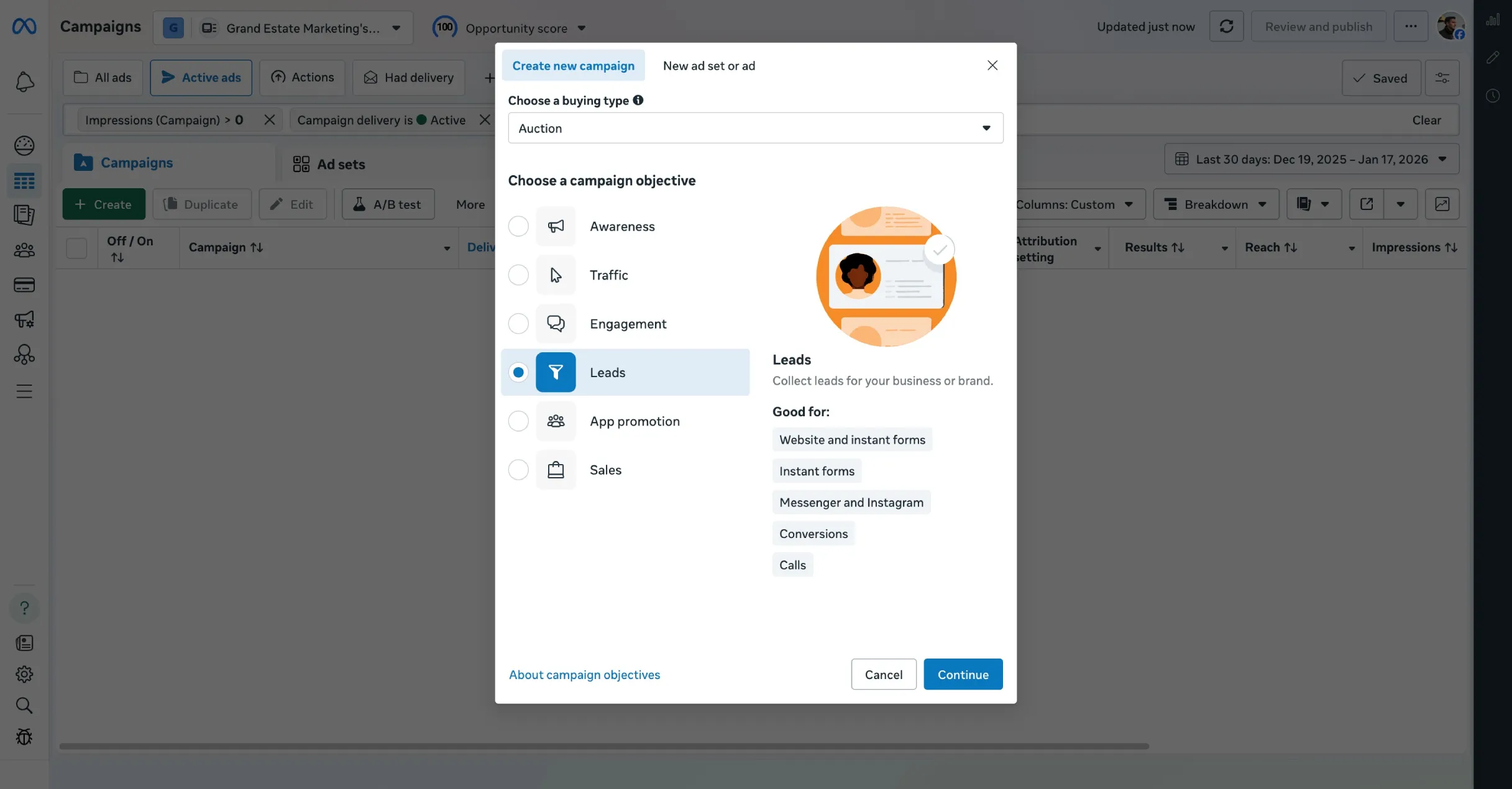
2. Choose Your Campaign Objective
Select "Leads" as your objective. This tells Facebook you want to collect contact information from potential clients. Facebook will optimize to show ads to people most likely to submit their info.
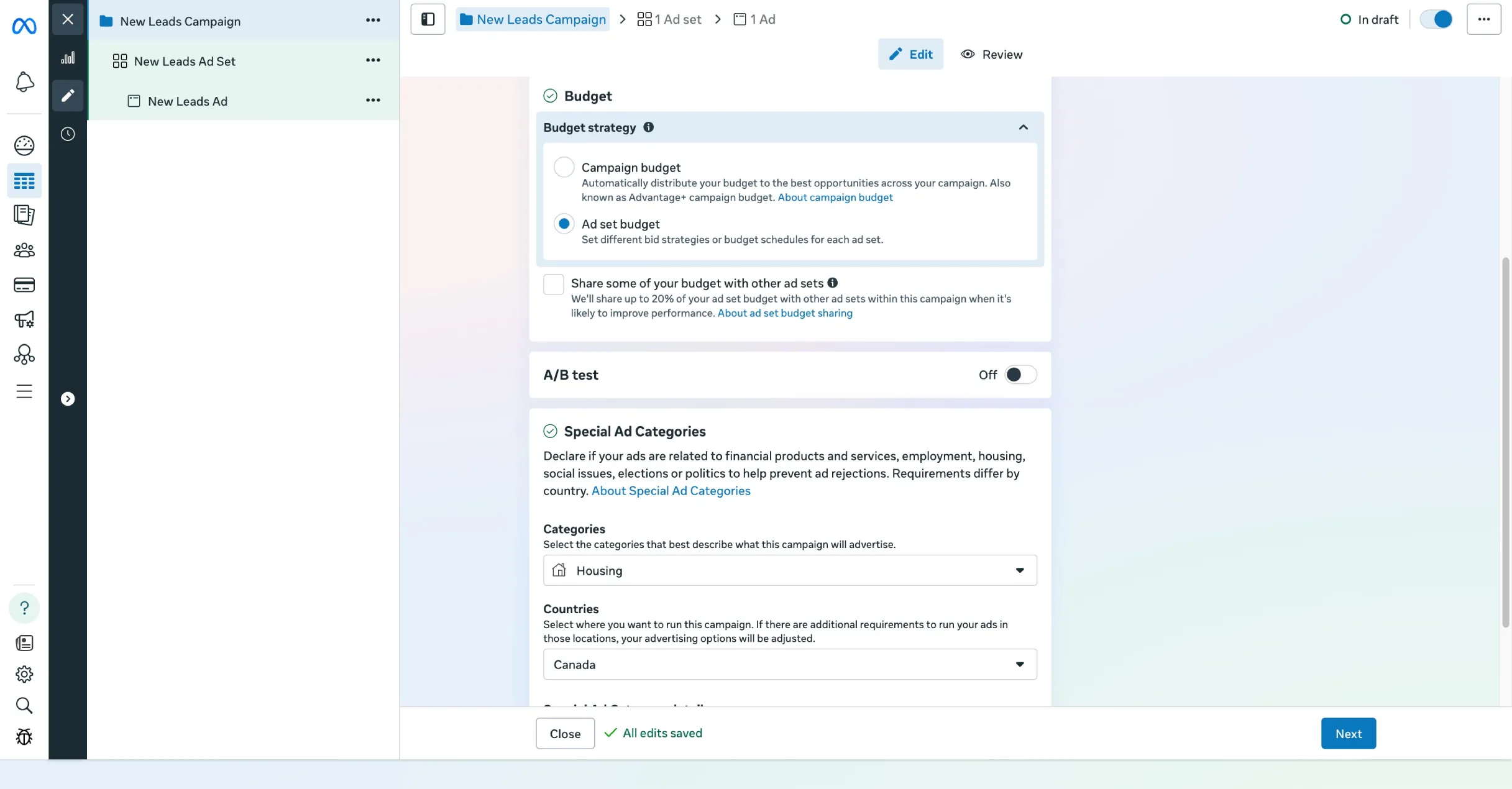
3. Campaign Settings
Use a descriptive campaign name like "Seller Leads - January 2026."
For special ad category, select "Housing." This is critical and required by law for real estate advertising. Failure to select this violates Fair Housing Act and Facebook policy.
4. Budget Strategy
Choose "Ad set budget," not campaign budget optimization. This gives you more control over individual ad set spending.
Turn off "Share budget with other ad sets." Leave Advantage Campaign Budget off for now.
3. Create Ad set(s)
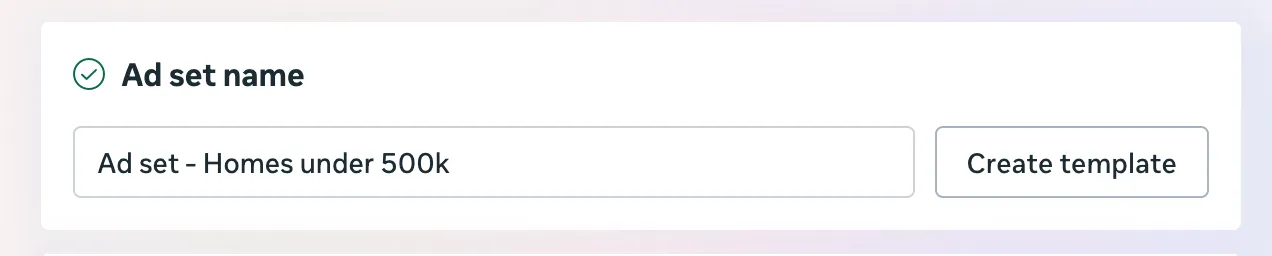
Ad Set Naming
Use clear, descriptive names.

Conversion Settings
For conversion location, choose "Website" or "Instant forms."
Website sends people to your landing page:
- Pros: More control, pre-qualify leads, builds website traffic
- Cons: Requires a landing page, extra step may reduce conversions
- Best for: Agents with a website who want higher-quality leads
Instant forms let people submit info directly on Facebook:
- Pros: Easier for users, higher conversion rates, no landing page needed
- Cons: Less control, form-fill fatigue, info stored in Facebook
- Best for: Agents without a website or who want maximum volume
Recommendation: We recommend website for higher quality leads.
For performance goal, select "Maximize number of leads."
Creative Settings
Set dynamic creative to off. This gives you more control over exactly what people see.
Budget & Schedule
- Budget: Minimum $20 per day per ad set
- Start date: Today or when you're ready
- End date: Select "No end date" (run continuously)
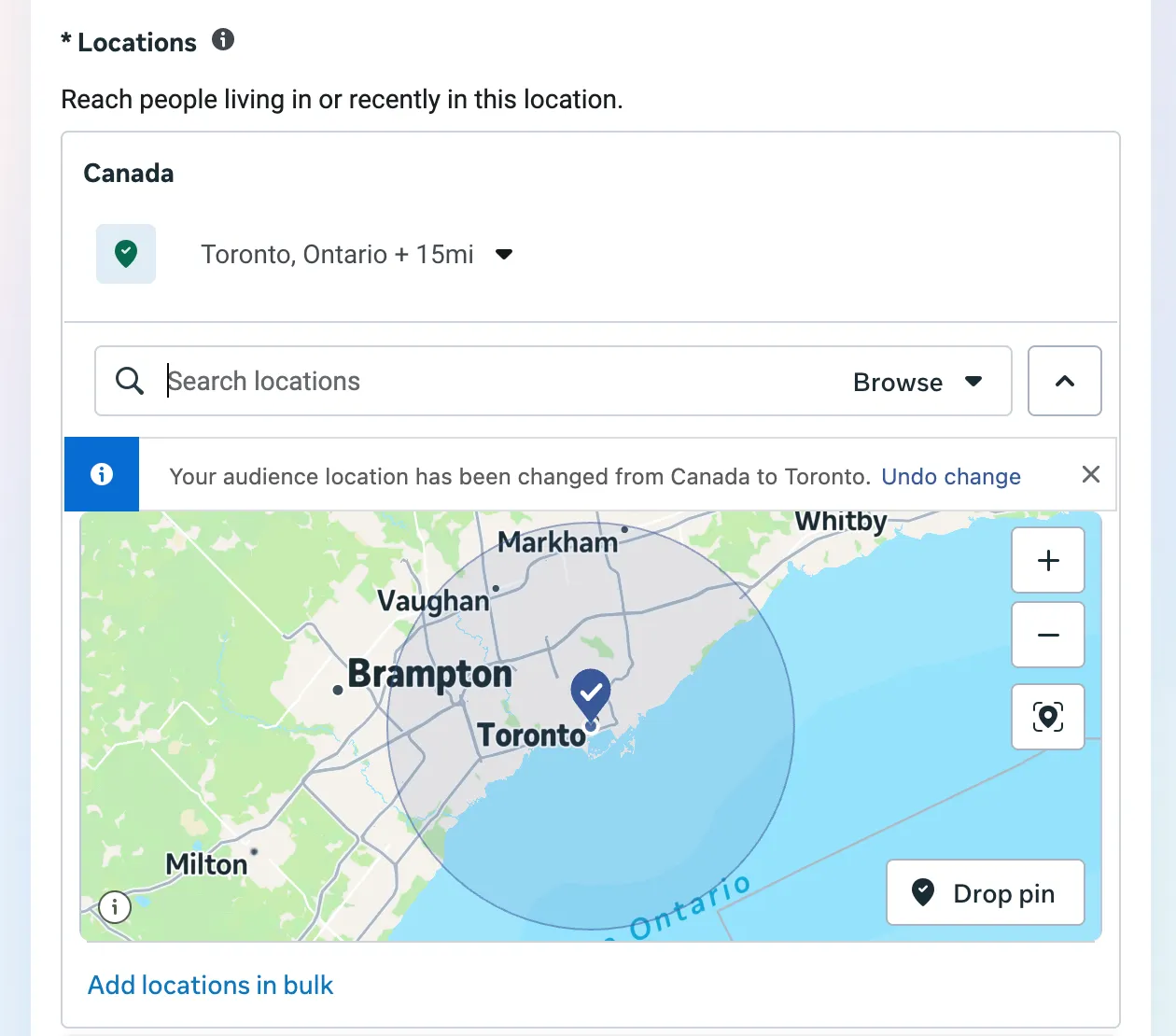
Audience Targeting
Location options:
- Radius: Enter your city/office address and set radius (e.g., 15 miles)
- Specific cities/neighborhoods: Type in the city names you serve
- ZIP codes: Enter multiple ZIP codes for most precise targeting
Select "People living in this location," not just traveling through.
For age, gender, and detailed targeting: leave the audience fields as is. Do not add detailed targeting initially. Facebook's algorithm is incredibly smart to serve your ads to relevant audiences.
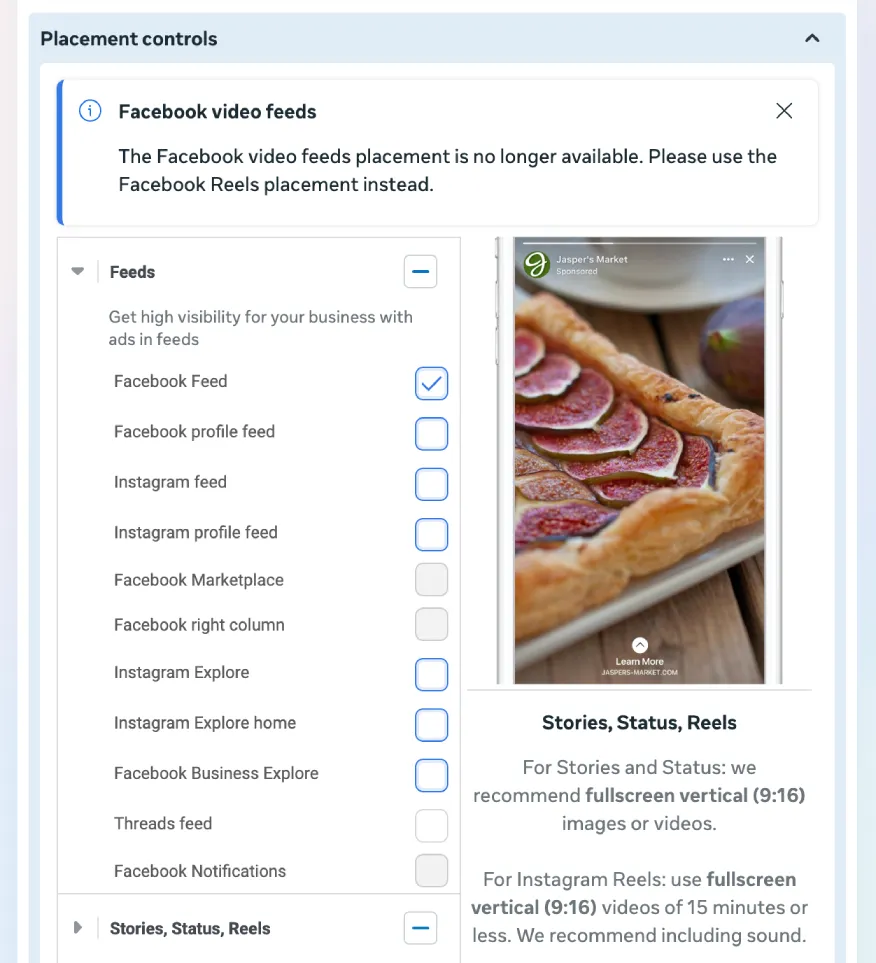
Placements
Click "Manual Placements."
Check:
- ✅ Facebook Feed
- ✅ Instagram Feed
- ✅ Facebook/Instagram Stories (optional)
- ✅ Reels (optional)
Uncheck:
- ❌ Audience Network
- ❌ Messenger
- ❌ In-stream videos
- ❌ Search results
Why limit placements? Feed, Story, and Reels placements generate the highest quality leads for real estate and prevent your budget from spreading too thin. You can expand later.
Leave device as "All devices."
4. Create Ad(s)
Best Types of Real Estate Ads
Type 1: Homes for Sale Under [Price] in [Location]
- Example: "3 Gorgeous Homes Under $400K in Downtown Austin"
- Target: Buyers at specific price points
- Offer: Click to see listings or get full list via email
Type 2: Social Proof / Case Study
- Example: "Just Sold for $47,000 Over Asking in Only 3 Days"
- Target: Sellers who want similar results
- Offer: Free home valuation or seller strategy call
Type 3: New Construction / Pre-Construction
- Example: "Last Chance: Only 4 Units Left in The Modern on Main"
- Target: Buyers interested in new builds
- Offer: Schedule a tour or get pre-construction pricing
Ad Creative
Video is recommended. It gets higher engagement and showcases properties better.
Options include:
- Property walkthroughs
- Neighborhood tours
- Agent testimonials
- Slideshows of listings with music
Aspect ratios:
- Square (1:1) or Vertical (4:5): Best for Facebook/Instagram Feed
- Vertical (9:16): Required for Stories
Design tools: Use Canva (free and user-friendly). Keep text to less than 20% of image space.
Quality standards:
- High resolution (no blurry images)
- Good lighting (bright, welcoming photos)
- Showcase the best features
- Mobile-first mindset
Ad Copy
Your hook is the first 1 to 2 sentences. This is what appears before "See more".
Strong hook examples:
- "Selling your home in 2026? This mistake could cost you $30,000..."
- "3 bedrooms under $350K in Arlington? Yes, they exist. Here's proof."
- "We sold 47 homes last year. Here's what every seller needs to know."
Keep it concise: Aim for 3 to 5 sentences in the primary text. Mobile users have short attention spans.
Focus on benefits, not features.
Address pain points directly:
- For first-time buyers: "Worried you'll overpay? My buyers never do. Here's why..."
- For sellers: "Selling before you buy your next home? Here's how to avoid the timing nightmare..."
- For investors: "Most investors miss these off-market deals. You won't anymore."
Include a clear call-to-action:
- "Click 'Learn More' to get your free home valuation"
- "Tap to download our First-Time Buyer Guide"
- "Click below to see all 8 listings under $400K"
Additional Ad Components
- Headline: 40 characters max (e.g., "Get Your Free Home Value")
- Description: At least 1 sentence summarizing the offer. Its better to write long-form posts.
- Call-to-Action Button: "Learn More", "Contact Us", etc.
How Many Ads to Create
Create 2 to 3 ads with different visuals per ad set. Same audience, same budget, but testing different creative.
If your budget is very limited (only $20/day), start with 1 ad per ad set. Add more after you have initial data.
Preview Your Ad
Use the preview panel on the right. Check the mobile feed view since it's most important. Ensure text isn't cut off, the image looks good, and the CTA is clear.
5. Publish
What Happens After You Click Publish
Facebook reviews your ad, usually within 24 hours, often much faster. You'll receive a notification when approved or if rejected.
Check Ads Manager to see your status: "In Review" → "Active" (approved) or "Rejected" (needs edits).
Common rejection reasons:
- Missing Housing category
- Text overlay too heavy
- Misleading claims
The Learning Phase - DO NOT TOUCH FOR 7 DAYS
The learning phase is when Facebook's algorithm gathers data to optimize your ad delivery. During the first 7 days, the algorithm is testing what times of day perform best, which audience segments respond, and what placements work.
You'll see "Learning" status in the Delivery column.
Why 7 days minimum? The algorithm needs at least 20 conversion events (leads) to exit learning. With a $20 per day budget, this often takes 5 to 10 days.
DO NOT:
- ❌ Change your budget (up or down)
- ❌ Edit your targeting
- ❌ Change your ad creative or copy
- ❌ Pause and unpause repeatedly
- ❌ Add or remove placements
Any significant change resets the learning phase.
What you CAN do:
- ✅ Monitor performance (check daily, but just observe)
- ✅ Respond to leads immediately (critical!)
- ✅ Take notes on patterns
- ✅ Plan your optimization strategy
What to expect during learning:
- Days 1-2: Results may be erratic (0 leads or 10 leads - don't panic)
- Days 3-5: Performance starts to stabilize
- Days 6-7+: You have enough data to evaluate
Cost per lead will fluctuate. Focus on the average over the full 7 days.
Your Job During These 7 Days
Focus on lead follow-up, not ad tweaking. Respond to every lead as soon as possible. This increases conversion by a lot.
Resist the urge to fiddle. Trust the process. The algorithm is learning.
After 7 days, the "Learning" status should change to "Active." Now you can analyze and optimize.
6. Optimization
When to Start Optimizing
Start after at least 7 days and the learning phase is complete. Preferably after 10 to 14 days if results are borderline.
How to Analyze Your Ads
Navigate to Ads Manager → select your campaign → view the Ads sets.
Key metrics:
- Impressions: How many times your ad was shown
- Clicks: Total clicks on your ad
- CTR (Click-Through Rate): Percentage of people who clicked
- Leads: Number of form submissions
- Cost Per Lead: Total spend ÷ number of leads
- Frequency: How many times the same person saw your ad (watch for ad fatigue if above 3-4)
The 5 Performance Scenarios
Scenario 1: Low Impressions + Low CTR
What it means: Your ad is barely being shown, and when it is, nobody cares.
Action: Turn this ad off. Start fresh with new creative or broader targeting.
Example: 1,000 impressions, 0.1% CTR, 0 leads after 7 days.
Scenario 2: Some Impressions + Low CTR, But Unclear Results
What it means: The ad is getting some traction but not enough data to judge yet.
Action: Run for 3 to 5 more days before making a decision.
Example: 5,000 impressions, 1.2% CTR, 2 leads, $40 cost per lead.
Scenario 3: High Impressions + Low CTR + Few or No Leads
What it means: Your ad is being shown a lot, but people aren't interested enough to click.
Diagnosis: Creative problem (image/video isn't eye-catching), copy problem (weak hook, unclear offer), or offer problem (what you're offering isn't compelling).
Action: Create a new ad with a different headline, more compelling offer, and better visual.
Example: 20,000 impressions, 0.3% CTR, 0-1 leads.
Scenario 4: High Impressions + High CTR + No Leads
What it means: People are interested (clicking), but something breaks down after the click.
Diagnosis: If using instant forms, the form has too many questions. If using a landing page, it's slow to load, there's a message mismatch, or the design is unprofessional.
Action: Fix the post-click experience. Simplify your instant form to just name, email, and phone. Improve landing page speed and design. Keep the ad running while you fix the backend.
Example: 15,000 impressions, 2.5% CTR, 0 leads (375 clicks but nobody converted).
Scenario 5: High CTR + High Leads (THE WINNER)
What it means: Everything is working. People see it, click it, and convert.
Action: Scale this ad. Do not turn it off or mess with it. Increase budget gradually (more on this in the next section).
Example: 25,000 impressions, 2.8% CTR, 30 leads, $15 cost per lead.
Additional Optimization Tips
Check lead quality, not just quantity. Are people answering your calls? Do they seem genuinely interested? Sometimes a $40 qualified lead is better than three $15 junk leads.
Look at placement performance: Navigate to "Breakdown" → "By Delivery." See which placements perform best. Turn off underperforming placements.
Watch for creative fatigue: If frequency goes above 3 to 4, refresh creative with a new image or video and update copy slightly.
What to Do with Losing Ads
Turn them off (pause, don't delete). Analyze why they failed using the 5 scenarios above. Apply those learnings to your next ad test.
Don't feel bad. Even pros have 50 to 70% of ads fail.
What to Do with Winning Ads
Scale them, protect them (don't make unnecessary changes), use them as templates, and study them to understand what your market responds to.
7. Scaling & Retargeting
Scaling Winning Ads: The Right Way
First, identify true winners. Wait until an ad has been running profitably for at least 7 to 10 days consistently.
Criteria for a "winning" ad:
- Cost per lead is acceptable (typically under $25 to $35)
- Lead quality is good
- Performance is stable
Scaling Method 1: Vertical Scaling (Increase Budget)
Use the 10 to 20% rule. Increase budget by no more than 10 to 20% every 2 to 3 days.
Example: $20/day → $24/day (20% increase) → wait 3 days → $28-29/day.
Why so conservative? Large budget jumps reset the algorithm's learning.
Watch for performance drops. If cost per lead spikes 50%+ after scaling, pause the increase and revert to previous budget.
When to stop scaling:
- Cost per lead becomes unprofitable
- Lead quality decreases noticeably
- You've hit audience saturation (frequency climbs above 4-5)
Scaling Method 2: Horizontal Scaling (Duplicate to New Ad Sets)
Create duplicate ad sets with the same winning ad creative, different audiences (new geographic areas), and separate budgets.
Why this works: It doesn't disrupt the original winning ad set and reaches fresh audiences.
Scaling Method 3: Lookalike Audiences (Advanced)
Lookalike audiences are when Facebook creates audiences of people similar to your best leads or clients.
To create one:
- Go to Audiences in Ads Manager
- Click "Create Audience" → "Lookalike Audience"
- Choose source: your lead list (requires at least 100 people), website visitors, or past clients
- Select location
- Choose size: 1% (most similar) to 10% (broader)
Start with 1% lookalikes. Create a new ad set targeting this lookalike audience with your winning ad.
What Happens When You Scale Too Fast
The algorithm resets. Performance tanks. You waste budget.
Example: Agent increases $20/day to $100/day overnight → CPL goes from $18 to $65 → panics and pauses everything → loses momentum.
Retargeting: Getting More from People Who've Engaged
Retargeting means showing ads to people who've already interacted with your business. These are "warm" audiences who know who you are. They're much cheaper and higher converting than cold audiences
Types of retargeting audiences:
- Website Visitors: People who visited your site in the last 30 days
- Video Viewers: People who watched 50%+ of your video ad
- Lead Form Openers: People who opened your instant form but didn't complete it
- Engaged Users: People who liked, commented, or shared your ad
How to Set Up a Retargeting Campaign:
- Create a Custom Audience (Audiences → Create → Custom Audience)
- Choose source (website, video, engagement, etc.)
- Define the time window (e.g., "last 30 days")
- Save the audience
- Create a new ad set targeting this custom audience
- Use different creative (address why they didn't convert)
Budget for retargeting: $5 to $10 per day (smaller audiences). Retargeting is typically 50 to 70% cheaper per lead than cold traffic.
Combining Scaling + Retargeting
As you scale your cold audience campaigns, your retargeting audiences grow automatically. This creates a compounding effect: more leads → more retargeting → more conversions → more scaling.
The Long-Term Scaling Mindset
Scaling is a marathon, not a sprint. 10 to 20% increases every few days compounds massively over 90 days.
$20/day → $25 → $30 → $36 → $43 → $52 → $62 over few weeks.
Common Mistakes With Real Estate Facebook Ads
1. Boosting posts instead of running proper campaigns. They're using that blue button instead of Ads Manager and leaving money on the table.
2. Not using the Facebook pixel. Without it, you can't track conversions, retarget visitors, or build custom audiences.
3. Not following up with leads quickly. A lead that sits for an hour is worthless. Respond within 5 minutes or lose to a competitor who does.
4. Using low-quality images or videos. Blurry photos and shaky videos make you look unprofessional.
5. Giving up too soon. One week isn't enough time. You need at least 30 days to see meaningful results.
6. Not tracking results properly. If you can't tell which ads are working, you can't optimize. Use a spreadsheet. Track everything.
7. Violating Fair Housing rules. Forgetting to select "Housing" as your special ad category can get your account shut down and expose you to legal risk.
Conclusion
The real estate agents winning today are the ones who've adapted to how people actually search for homes and agents. It's on social media, not in newspaper ads.
Facebook ads level the playing field. You don't need a big team or massive budget to compete. You need smart strategy and persistence.
Every agent who's now generating 50+ leads per month from Facebook started exactly where you are: confused, skeptical, and nervous about wasting money.
They learned the system. They tested and optimized. They built their real estate branding strategy one campaign at a time.
You can do the same.